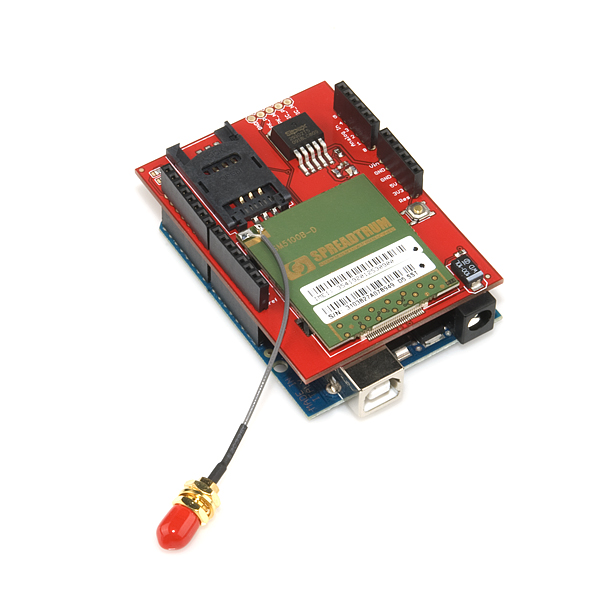
-Visual Representation of my work day - Jan 6, 2012
Due to the nature of my work I am required to log my kilometers both on paved and unpaved roads each day. As I am somewhat forgetful this ends up being something I seldom do, and at the end of the month when my invoice is due I often find myself scrambling to figure out how many kilometers to bill to each day.
As a consequence I usually end up guessing low to avoid closer scrutiny and effectively short myself money through laziness / procrastination.
-The Blue Bomb, 341,000 km on original power train, sometimes you just have to pat them on the head and say 'that's a good girl'
I received the ADafruit GPS shield over Christmas and have played with it enough to get it to the point where I think it should not only be able to log my kilometers according to road type, but also provide the foundation to create my invoice for me at the end of each month.
I won't go into the specifics of soldering the shield, or the code required to start logging NMEA sentences as it has already been very well documented by
Lady Ada.
One thing I did notice however, while playing with her code and getting the unit up and running is that I did not feel like parsing a bunch of NMEA sentences to use this device, especially when I had little use for much of the information contained in the NMEA sentences.
Enter
TinyGPS by Mikal Hart. As described on his website
"TinyGPS is designed to provide most of the NMEA GPS functionality I imagine an Arduino user would want – position, date, time, altitude, speed and course – without the large size that seems to accompany similar bodies of code. To keep resource consumption low, the library avoids any floating point dependency and ignores all but a few key GPS fields."
His library and examples work exactly as advertised, however I had a hard time finding examples of integrating his product with the SD Card library, or data logging in general. Most examples on the internet are focused on where the user is in the instant, and I was looking for a way to figure out where I have been.
In my typical uneducated programming fashion I started slamming together various pieces of code until I found something workable. By following the SD card examples present in the Arduino IDE, I was able to log information to the SD card, and even added in the code to log six analog variables at the same time. While not implemented fully yet, I intend to use these to monitor the ambient temperature of my truck cab, the outside temperature, engine oil temperature, transmission temperature and differential temperatures.
One piece of information missing from this equation was distance travelled. I initially ran the program using basic geometry and found that is was only accurate to +/- 15%, which was is probably no more accurate than my educated guesses I currently use for my invoices. After some Google-Fu I determined that my error was caused by the curvature of the earth.
Luckily this is not a new problem and can be easily solved using the Haversine Formula. Once I implemented this method of calculating difference I found the Distance calculation to be accurate to +/- 0.05%, definitely good enough.
-Plotting Speed Versus Elevation, I thought there would be more of a correlation, but apparently those 4.56 gears were a good investment :)
Code so Far: (be warned, I have the programming finesse of a Sledgehammer)
Extra Special Thanks to Arkitekt for answering my stupid questions about programming.
#include <NewSoftSerial.h>
#include <TinyGPS.h>
#include <SD.h>
// 4800-baud serial GPS device hooked up on pins 2(rx) and 3(tx).
//declare variables for analog channels//
int AnalogPin0 = A0;
int AnalogValue0 = 0;
int AnalogPin1 = A1;
int AnalogValue1 = 0;
int AnalogPin2 = A2;
int AnalogValue2 = 0;
int AnalogPin3 = A3;
int AnalogValue3 = 0;
int AnalogPin4 = A4;
int AnalogValue4 = 0;
int AnalogPin5 = A5;
int AnalogValue5 = 0;
const int chipSelect = 10; //SD CARD
// Setup Global File
File dataFile;
TinyGPS gps;
NewSoftSerial nss(2, 3);
float flat, flon, x2lat, x2lon, latstore, lonstore, diststore;
//float diststore = 0;
void gpsdump(TinyGPS &gps);
bool feedgps();
void printFloat(double f, int digits = 2);
#define powerpin 4
void setup()
{
if (powerpin) {
pinMode(powerpin, OUTPUT);
}
// Use the pin 13 LED as an indicator
pinMode(13, OUTPUT);
Serial.begin(9600);
//SD CARD
Serial.print("Initializing SD card...");
// make sure that the default chip select pin is set to
// output, even if you don't use it:
pinMode(10, OUTPUT);
// see if the card is present and can be initialized:
if (!SD.begin(chipSelect)) {
Serial.println("Card failed, or not present");
// don't do anything more:
return;
}
Serial.println("card initialized.");
//////SD CARD
nss.begin(4800);
digitalWrite(powerpin, LOW);
}
void loop()
{
//read analog channels and store//
AnalogValue0 = analogRead(AnalogPin0);
AnalogValue1 = analogRead(AnalogPin1);
AnalogValue2 = analogRead(AnalogPin2);
AnalogValue3 = analogRead(AnalogPin3);
AnalogValue4 = analogRead(AnalogPin4);
AnalogValue5 = analogRead(AnalogPin5);
// Open DataFile
dataFile = SD.open("datalog.txt", FILE_WRITE); //SD CARD
bool newdata = false;
unsigned long start = millis();
// sample as quickly as possible, otherwise distance calculation will come up short due to 'cutting corners'
while (millis() - start < 500)
{
if (feedgps())
newdata = true;
}
if (newdata)
gpsdump(gps);
//Display analog values
if (dataFile) {
dataFile.print("A0:");
dataFile.print(",");
dataFile.print(AnalogValue0);
dataFile.print(",");
dataFile.print("A1:");
dataFile.print(",");
dataFile.print(AnalogValue1);
dataFile.print(",");
dataFile.print("A2:");
dataFile.print(",");
dataFile.print(AnalogValue2);
dataFile.print(",");
dataFile.print("A3:");
dataFile.print(",");
dataFile.print(AnalogValue3);
dataFile.print(",");
dataFile.print("A4:");
dataFile.print(",");
dataFile.print(AnalogValue4);
dataFile.print(",");
dataFile.print("A5:");
dataFile.print(",");
dataFile.print(AnalogValue5);
dataFile.print(",");
dataFile.println();
}
}
void printFloat(double number, int digits)
{
// Handle negative numbers
if (number < 0.0)
{
dataFile.print('-');
number = -number;
}
// Round correctly so that print(1.999, 2) prints as "2.00"
double rounding = 0.5;
for (uint8_t i=0; i<digits; ++i)
rounding /= 10.0;
number += rounding;
// Extract the integer part of the number and print it
unsigned long int_part = (unsigned long)number;
double remainder = number - (double)int_part;
dataFile.print(int_part);
// Print the decimal point, but only if there are digits beyond
if (digits > 0)
dataFile.print(".");
// Extract digits from the remainder one at a time
while (digits-- > 0)
{
remainder *= 10.0;
int toPrint = int(remainder);
dataFile.print(toPrint);
remainder -= toPrint;
}
}
void gpsdump(TinyGPS &gps)
{
long lat, lon;
unsigned long age, date, time, chars;
int year;
byte month, day, hour, minute, second, hundredths;
unsigned short sentences, failed;
feedgps();
gps.crack_datetime(&year, &month, &day, &hour, &minute, &second, &hundredths);
if (dataFile) {
dataFile.print("Date: ");
dataFile.print(",");
dataFile.print(static_cast<int>(month));
dataFile.print("/");
dataFile.print(static_cast<int>(day));
dataFile.print("/");
dataFile.print(year);
dataFile.print(",");
dataFile.print("Time: ");
dataFile.print(",");
dataFile.print(static_cast<int>(hour)); //how to compensate for time zones?
dataFile.print(":");
dataFile.print(static_cast<int>(minute));
dataFile.print(":");
dataFile.print(static_cast<int>(second));
dataFile.print(".");
dataFile.print(static_cast<int>(hundredths));
dataFile.print(",");
dataFile.print("UTC");
dataFile.print(",");
}
feedgps();
gps.f_get_position(&flat, &flon);
if (dataFile) {
dataFile.print("Lat: ");
dataFile.print(", ");
printFloat(flat, 5);
dataFile.print(", ");
dataFile.print("Long: ");
dataFile.print(", ");
printFloat(flon, 5);
dataFile.print(",");
}
feedgps();
if (dataFile) {
dataFile.print("Alt(meters): ");
dataFile.print(",");
printFloat(gps.f_altitude());
dataFile.print(",");
dataFile.print("Speed(kmph): ");
dataFile.print(",");
printFloat(gps.f_speed_kmph());
dataFile.print(",");
}
feedgps();
gps.stats(&chars, &sentences, &failed);
if (dataFile) {
dataFile.print("Failed checksum: ");
dataFile.print(",");
dataFile.print(failed);
dataFile.print(",");
}
distance();
}
bool feedgps()
{
while (nss.available())
{
if (gps.encode(nss.read()))
return true;
}
return false;
}
void distance(){
float flat1=flat; // flat1 = our current latitude. flat is from the gps data.
float flon1=flon; // flon1 = our current longitude. flon is from the gps data.
float dist_calc=0;
float dist_calc2=0;
float diflat=0;
float diflon=0;
x2lat = latstore; //last latitude reading, stored from previous cycle (first cycle has nothing)
x2lon = lonstore; //last longitude reading, stored from previous cycle (first cycle has nothing)
//-------------------------------- distance formula below. Calculates distance from current location to waypoint
diflat=radians(x2lat-flat1); //notice it must be done in radians
flat1=radians(flat1); //convert current latitude to radians
x2lat=radians(x2lat); //convert waypoint latitude to radians
diflon=radians((x2lon)-(flon1)); //subtract and convert longitudes to radians
dist_calc = (sin(diflat/2.0)*sin(diflat/2.0));
dist_calc2= cos(flat1);
dist_calc2*=cos(x2lat);
dist_calc2*=sin(diflon/2.0);
dist_calc2*=sin(diflon/2.0);
dist_calc +=dist_calc2;
dist_calc=(2*atan2(sqrt(dist_calc),sqrt(1.0-dist_calc)));
dist_calc*=6371.0000; //Converting to kilometers
if (dataFile) {
dataFile.print("Distance (km):");
dataFile.print(",");
if (dist_calc < 1) // having no data in holding register causes code to throw extremely large number for first iteration of loop, 1 would be over 400 kmph so we should be okay
{
dataFile.print(dist_calc);
diststore = diststore + dist_calc;
}
else
{
dataFile.print("0.000000000"); // if large number is thrown on startup ignore it, but put in lots of zeros to know the number is bullshit
diststore = diststore + 0;
}
dataFile.print(",");
latstore = flat;
lonstore = flon;
dataFile.print("Total Distance:");
dataFile.print(",");
dataFile.print(diststore);
dataFile.print(",");
dataFile.println();
}
}
Still to Come:
Using a vibration sensor to determine whether or not I am on gravel / pavement to log distances accordingly.
Install and calibrate temperature transmitters, it will be interesting to see the correlations between various temperatures and speed/elevation.
Implementing a power down sequence which stores total distance into EEPROM to avoid unit calculating from zero on each power up.
Automate the entire process of creating my invoice.
Rubber Feet to stop it from Falling on the Floor when I go around corners